
ChatGPT memory vs Substrate: when the built-in memory is enough
An honest comparison by Substrate: when ChatGPT's built-in memory is enough, when it isn't, and how ChatGPT connects to Substrate as a custom MCP connector.
This comparison is written by Substrate, so read it with that in mind. The facts about ChatGPT come from OpenAI's own Help Center pages, read on November 5, 2026: Memory in ChatGPT and Connecting custom MCP servers in ChatGPT.
The short answer. For most people, ChatGPT's built-in memory is enough, and they don't need anything else. If you mostly use ChatGPT, for yourself, and want it to remember your preferences and context, you are fine. The built-in memory stops being enough when you run several agents or tools besides ChatGPT, or when other people need the same context. That is the case Substrate (trysubstrate.co) is built for.
What is ChatGPT memory, and what does it do?
When Memory is on, ChatGPT can remember preferences and details from your chats and other available sources. Per OpenAI's page, depending on your plan and region those sources can include past chats, saved memories, custom instructions, saved files in Library or Space, and content from connected apps such as Gmail.
You manage it in Settings, then Personalization, then Memory. You can ask ChatGPT what it remembers, correct it, and delete things. Temporary chat does not create or update memories, and before you start one you can choose whether it uses your existing memories. OpenAI also says that controls vary by plan, region, platform and workspace, so some of this may not show up for your account.
When is ChatGPT's built-in memory enough?
It is enough when ChatGPT is the main place you work and the memory only has to make it feel personal: your name, your tone, your recurring projects, how you like answers formatted. It is a switch inside the product you already use, so there is nothing else to set up. You do not need a second tool for that, and adding one would only be more to maintain.
If that describes you, stop here and use it. You can read Claude vs ChatGPT: which is better? if you are still choosing between assistants.
When is ChatGPT's memory not enough?
It stops being enough in a few specific ways, taken from OpenAI's own page or from what the page does not say:
- It is not a full record. OpenAI says memory does not retain every detail from every conversation. ChatGPT decides which information is relevant. The memory summary is a high-level view and does not necessarily include every detail or source. That is fine for personalization and a poor fit for a source of truth.
- Deleting happens in several places. Deleting a chat does not necessarily delete a separate saved memory. OpenAI may retain logs of deleted saved memories for up to 30 days.
- It is a ChatGPT feature. The page describes memory inside ChatGPT. Nothing on it says that other assistants or agents, such as Claude Code or Cursor, can use it. With several agents, you end up repeating the same context to each one.
- Other people. The page covers your own memory and what workspace owners and admins can manage. It does not describe a way to hand a piece of your context to a colleague.
If you run a fleet of agents and a small team, the last two are the ones that cost time.
What does Substrate do differently?
Substrate is one memory that you and your agents read and edit. It is not a feature inside one assistant. You connect sources: Gmail and Notion (both read-only), WhatsApp by QR code where enabled, and file uploads. Agents connect by plugin (Claude Code, Cowork, Codex, Hermes) or by MCP (claude.ai, ChatGPT, Cursor, OpenClaw, Grok CLI). You approve and revoke each agent connection yourself.
You can share one page with named people by email invite. It is view-only, and you can revoke it. Substrate is not a team workspace with roles. The tagline is "AI memory for your team, editable, permissioned, owned."
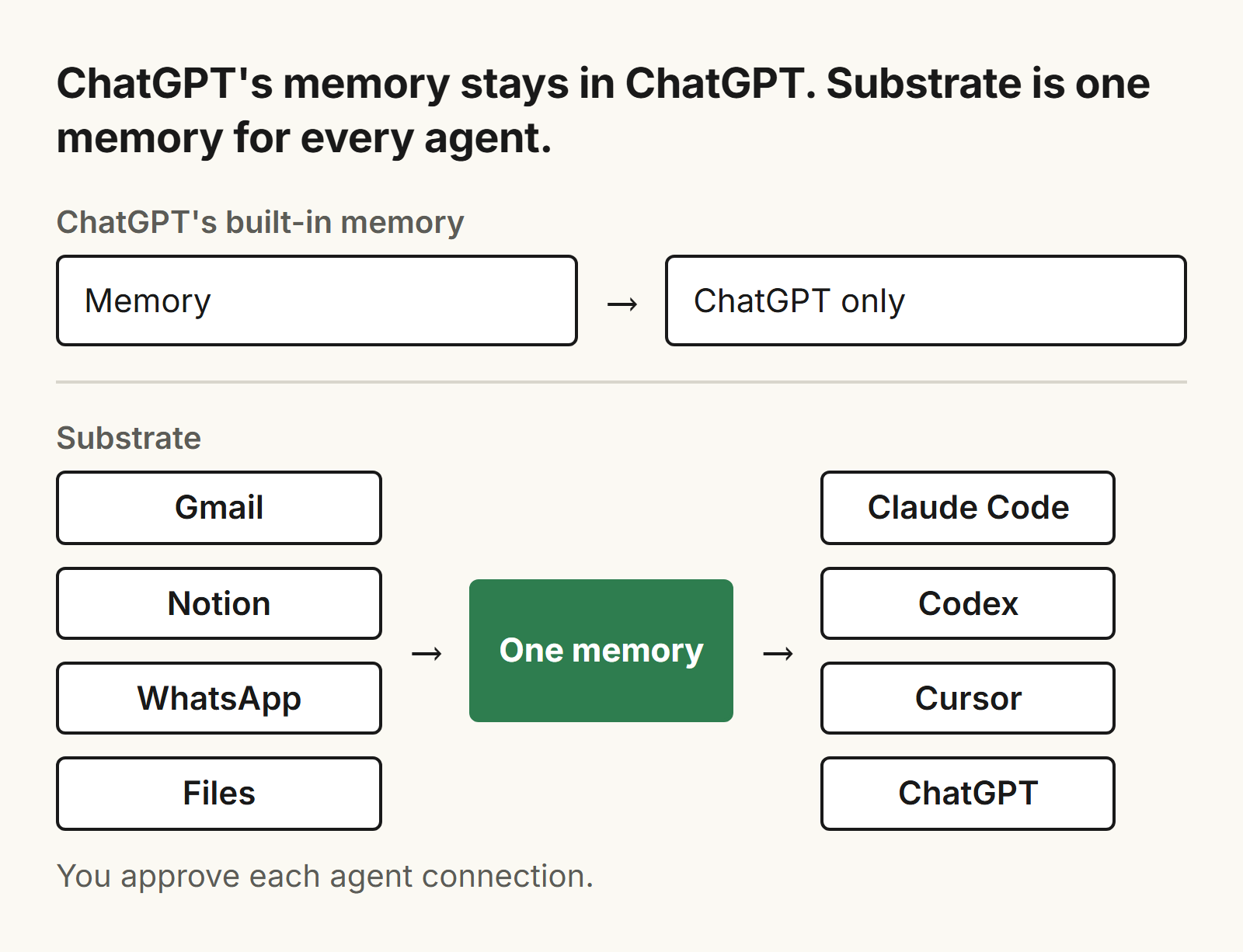
ChatGPT lets you correct and delete what it remembers too, so editing is not what separates the two. The difference is that Substrate is the same memory for every agent you connect, and you can open it and read it. The table sums it up:
| ChatGPT's built-in memory | Substrate | |
|---|---|---|
| Built for | Personalizing ChatGPT for you | One memory shared by you and your agents |
| Where it works | Inside ChatGPT | Claude Code, Codex, Cursor, Cowork, claude.ai, and ChatGPT on the web where your plan allows it, among others |
| Sources | Past chats, saved memories, custom instructions, saved files, connected apps such as Gmail, depending on plan and region | Gmail and Notion (read-only), WhatsApp by QR where enabled, file uploads |
| See and fix | Ask what it remembers, edit or delete where the controls are available; the summary is high-level | Open the memory and edit the same memory your agents recall |
| Sharing | Workspace owners and admins manage supported settings | One page to named people by email invite, view-only, revocable |
| Price | Part of ChatGPT; plan prices not covered here | $20 a month for one person and all of their agents, 7-day trial, no card |
For the wiring behind this, see what an MCP memory server is and how to share context between Claude and Cursor. For the same question about Claude, see Claude memory.
Can ChatGPT use Substrate?
Yes, through a custom MCP connector, on the plans that allow it. You add Substrate yourself as a custom MCP server, review OpenAI's risk warning, and authorize the connection in your browser.
OpenAI's page on custom MCP servers sets limits. As of November 5, 2026, custom MCP connections are for ChatGPT on the web, not on mobile. Full custom MCP support is listed for Business and Enterprise/Edu. On Business, only workspace admins and owners can add them. Pro users can connect custom servers with read and fetch permissions. The page does not mention Free or Plus, so check that your plan allows it before you count on it. ChatGPT may ask you to confirm write actions. We list ChatGPT as a supported agent, but this post does not report a test of the full flow on every plan.
Should you use ChatGPT memory or Substrate?
Stay with ChatGPT's built-in memory if:
- ChatGPT is the one assistant you use for most things;
- you want it to remember preferences, tone and ongoing projects, and nothing more;
- the context is yours alone, and nobody else needs it;
- you would rather not pay for or maintain another tool.
Choose Substrate if:
- you run several agents (Claude Code, Codex, Cursor, ChatGPT and others) and are tired of re-explaining the same context to each;
- you want to open the memory, read what the agents recall, and fix it when it is wrong;
- your context lives in Gmail, Notion or WhatsApp, and you want it connected without writing code;
- a few people besides you need to read some of it, and an email-invited, view-only page is enough;
- you would rather pay a flat $20 a month and start with a 7-day trial.
The two are not exclusive. You can keep ChatGPT's memory on for personalization and use Substrate for the context your agents share.
Frequently asked questions
Is ChatGPT's built-in memory enough?
For most people, yes. If you mostly use ChatGPT for yourself and want it to remember your preferences and context, it is enough. It stops being enough when you run several agents or tools besides ChatGPT, or when other people need the same context. (Per OpenAI's Help Center, read November 5, 2026.)
Does ChatGPT remember everything I say?
No. OpenAI's page says memory does not retain every detail from every conversation, and ChatGPT decides which information is relevant. The memory summary is a high-level view and does not necessarily include every detail or source. (As of November 5, 2026.)
Can I see and delete what ChatGPT remembers?
Yes. You can ask ChatGPT what it remembers, and manage memory in Settings, Personalization, Memory, where the controls are available for your account. Deleting a chat does not necessarily delete a separate saved memory. (As of November 5, 2026.)
Can ChatGPT connect to Substrate?
Yes, as a custom MCP connector, on the plans that allow it. You add Substrate yourself as a custom MCP server. OpenAI's page lists custom MCP connections for the web, with full support for Business and Enterprise/Edu and read and fetch permissions for Pro. It does not mention Free or Plus, so check your plan. (As of November 5, 2026.)
How much does Substrate cost?
Substrate is $20 per month on one plan, for one person and all of their agents. You can try it for 7 days, without a card.
Related posts
Claude's built-in memory vs Substrate: is the built-in memory enough?
Claude's built-in memory vs Substrate, written by Substrate: when the built-in memory is enough, when it isn't, and a three-question test.
Supermemory alternatives: Substrate vs Supermemory, where each wins
Substrate and Supermemory are different products. Where each one wins, plus pricing, MCP, Claude Code and open source, checked November 2026.
Zep alternatives: Substrate vs Zep, where each one wins
An honest comparison of Substrate and Zep by Substrate: pricing, open source, agents and sources, and when to choose each.