
MCP memory: what it is, how to set it up, how to choose
What an MCP memory server is, real Claude Code and Cursor config for the official one, and how it compares with four alternatives.
An MCP memory server gives an AI agent tools to save and look up facts between sessions. The agent will save or look up information only if the model decides to use the tools. Nothing is saved automatically.
The official one from the MCP project saves a knowledge graph to a local JSONL file on one machine, and you just run one command in Claude Code or provide one JSON file in Cursor. For one agent on one laptop this should be sufficient.
When you have many agents and a few people, three questions matter: where is the data stored, who can read and correct it, and do all the agents see the same thing? Facts below are as of November 2026.
What is an MCP memory server?
MCP is the Model Context Protocol, a standard way for an agent (like Claude Code or Cursor) to call external tools. A memory server is one such tool provider. It exposes memory management tools such as search and create, and the agent calls them either via stdio (if the memory server is a local process) or via HTTP (if the memory server is remote).
It also doesn't increase the context window size and it is not automatic - the model decides when to write and when to read.
CLAUDE.md and Cursor rules are a different thing though - these are files you write, and the agent reads them at the start of every session.
So you can use both: use the rules for more stable instructions and the memory for things the agents learn as they work.
What does the official MCP memory server store?
The official memory server is the reference implementation in the MCP servers repository: npm package @modelcontextprotocol/server-memory, version 2.1.0 as of November 2026.
It is a knowledge graph storing entities, the relations between them and facts (observations) attached to these entities. You can interact with it using nine tools: create_entities, create_relations, add_observations, delete_entities, delete_observations, delete_relations, read_graph, search_nodes and open_nodes.
The graph is a single JSONL file where each line represents either an entity or a relation. You can open it with any text editor. In a test run, creating one entity through create_entities left exactly this line in the file:
{"type":"entity","name":"my-api","entityType":"project","observations":["uses pnpm and Vitest"]}
Search is a text match based on names, types and the observation text. It is not semantic search. There is no account and no API key involved.
How do I set up MCP memory in Claude Code?
In Claude Code you can add the server with just one command. Point MEMORY_FILE_PATH at an absolute path that you own. You have to create the folder first, because the server only creates the file. The double dash is used to separate the options you can give to Claude from the command that starts the server.
mkdir -p ~/.mcp
claude mcp add --scope user --env MEMORY_FILE_PATH=$HOME/.mcp/memory.jsonl --transport stdio memory -- npx -y @modelcontextprotocol/server-memory
By default, the scope is local to this project only and is saved in ~/.claude.json. If you want to make the server available in all your projects, you can use the user scope, like in the example command above. Alternatively, you can use the project scope, which creates a .mcp.json file in the current repository. This file could then be committed, so that all your teammates' Claude Code instances start with the same server. In any case, each user still has their own file, as the path to it is specific to the user's machine.
You can check that with claude mcp list or simply /mcp in the session. Tested on Claude Code 2.1.296: the same command in a scratch folder resulted in claude mcp get reporting that it is connected and the file path is set. For how CLAUDE.md fits next to a memory server, see the post Claude Code memory.
The same entry written by hand, in .mcp.json:
{
  "mcpServers": {
    "memory": {
      "type": "stdio",
      "command": "npx",
      "args": ["-y", "@modelcontextprotocol/server-memory"],
      "env": { "MEMORY_FILE_PATH": "${HOME}/.mcp/memory.jsonl" }
    }
  }
}
How do I set up an MCP memory server in Cursor?
Cursor reads the file .cursor/mcp.json in your project, or ~/.cursor/mcp.json for every project. The same server entry works, but Cursor uses ${env:NAME} and ${userHome} as variables, while Claude Code uses ${VAR}.
{
  "mcpServers": {
    "memory": {
      "type": "stdio",
      "command": "npx",
      "args": ["-y", "@modelcontextprotocol/server-memory"],
      "env": { "MEMORY_FILE_PATH": "${userHome}/.mcp/memory.jsonl" }
    }
  }
}
After saving you have to restart Cursor. If the server does not appear, you can open the Output panel and select MCP Logs. To test that this works, you can ask an agent to remember one fact, and then ask it to tell you this fact in a new chat. If you want to share instructions as well as memory between the two tools, please read How to share context between Claude and Cursor.
What breaks when many agents share one MCP memory server?
By default the file is memory.jsonl in the package folder. Under npx, that folder can be cleared together with the npm cache. So always set the MEMORY_FILE_PATH environment variable.
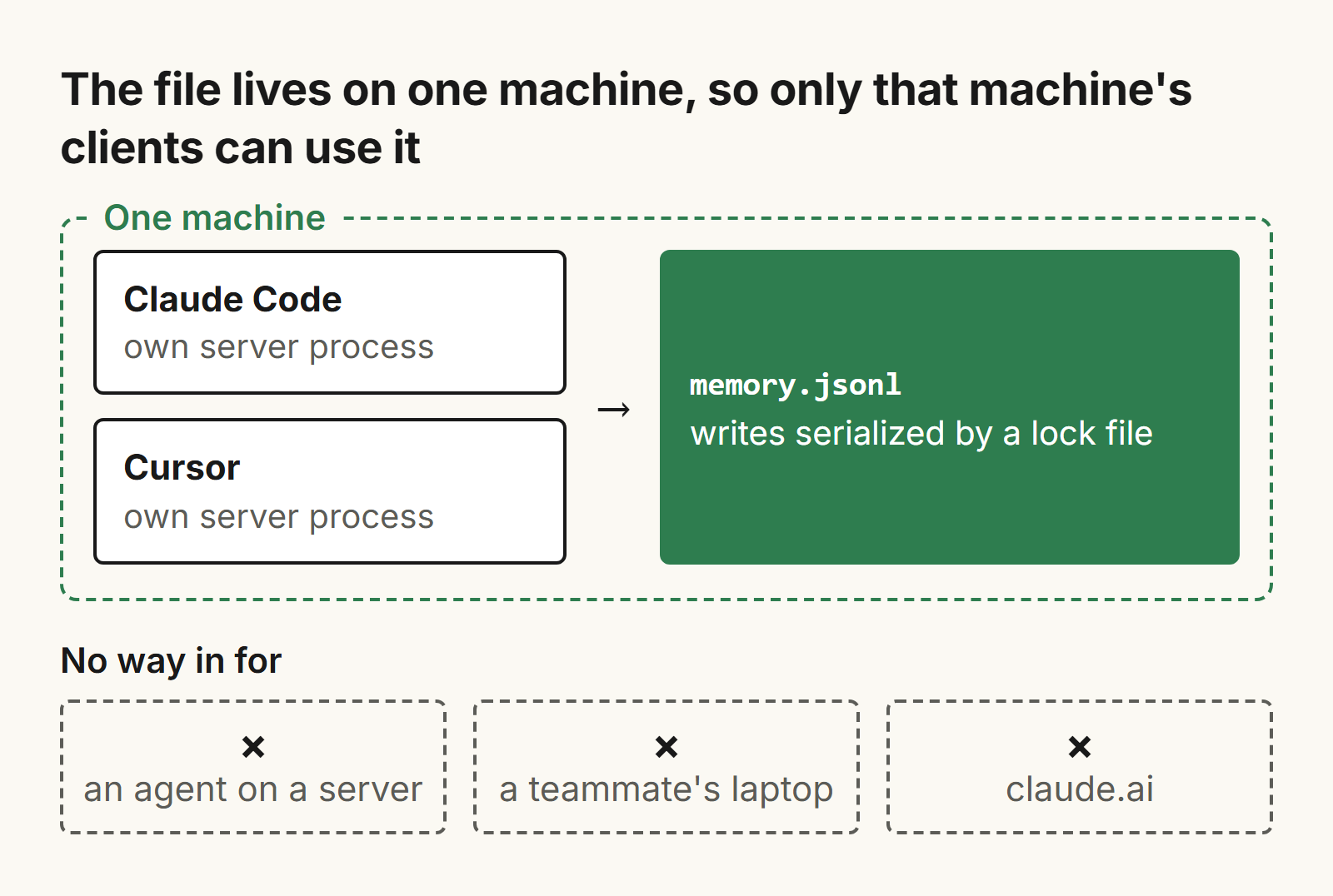
Each client starts its own server process. To avoid interfering with each other when writing to the same file, all writes are serialized using a lock file in the same directory as the memory file. If a client does not manage to obtain the lock within 60 seconds, an error is returned. This allows both Claude Code and Cursor to use the same file on the same machine without interfering with each other.
The file is on that one machine and cannot be reached by an agent on a server, a teammate's laptop or even a hosted tool like claude.ai.
The model decides what to save. If 10 agents write to it, they will write facts that get outdated and contradict each other. So someone has to read the graph and correct it. Never let your agents store secrets in their memory.
On native Windows the official README wraps the command as cmd /c npx. This is not tested here.
Which MCP memory server should I choose?
If you want to decide where your data will live and who will have access to it - you have several options. If you are the only person who will be using this system on a single computer, and you want to experience what MCP memory feels like, it might be best to use the official server. If you want other people to be able to read and correct the memory, you should choose markdown files. If you want to allow many agents on different machines to use the same memory, you will need to select a service that provides HTTP access and login functionality. You should never put secrets in any of these, and it is a good idea to check once a week what changes were saved by your agents.
| Server | What it stores | Where the data lives | Use it when |
|---|---|---|---|
| Official memory server | Knowledge graph in one JSONL file | One local file | One person, one machine |
| Basic Memory | Markdown notes plus a SQLite index | ~/basic-memory on disk, or its hosted sync | People and agents edit the same notes |
| mcp-memory-service | Tagged memories and a graph of typed relations | SQLite, Cloudflare, hybrid or Milvus | Many agents hit one self-hosted service |
| Graphiti MCP server | Temporal knowledge graph of episodes and facts | FalkorDB or Neo4j | Facts change over time |
| Substrate | One memory people and agents both edit | Hosted | A person and several agents must see the same memory |
Basic Memory
Basic Memory saves your knowledge as plain Markdown files, one per entity, with observations and links to other notes. To keep search quick, it maintains a local SQLite index. The default directory for the notes is ~/basic-memory. You can read, edit and commit these files with your usual tools. The licence is AGPL-3.0. A hosted version with sync is listed at $19 per month with a 7-day free trial. It suits people and agents who want to work on the same set of readable notes.
claude mcp add basic-memory -- uvx --prerelease=allow basic-memory mcp
For Cursor, the entry is "command": "uvx", "args": ["--prerelease=allow", "basic-memory", "mcp"].
mcp-memory-service
mcp-memory-service stores memories with associated tags, models a graph of typed relations between them and can consolidate older memories. It can be used with SQLite for a single user, Cloudflare for multi-device sync, a combination of both, or Milvus. It also provides a REST API and a web dashboard, and it can serve remote MCP over HTTPS with OAuth 2.0. By default the server listens on 127.0.0.1, so to expose it you have to provide authentication and network controls. The licence is Apache-2.0. It suits several agents and tools that all need one self-hosted service.
pip install mcp-memory-service
claude mcp add memory -- memory server
Graphiti MCP server
The Graphiti MCP server is a temporally aware knowledge graph, populated from episodes. It contains entities and facts and runs on either FalkorDB (bundled in its Docker container) or Neo4j. An LLM (OpenAI by default, so an API key is required) is used to extract the facts. By default the server listens on localhost:8000/mcp/. The project calls it a reference implementation with no authentication, and says not to use it as a production deployment. It fits facts that change over time, when you want to ask what was true at a certain point in time.
{ "mcpServers": { "graphiti-memory": { "url": "http://localhost:8000/mcp/" } } }
Substrate
Substrate (trysubstrate.co) is a hosted memory for you and your agents: AI memory for your team, editable, permissioned, owned. You and your agents can read and edit the same memory.
Agents can connect via MCP at https://app.trysubstrate.co/mcp, with an OAuth sign-in. There is no need to generate an API key.
Claude Code connects through a plugin. Run these two commands in your terminal: claude plugin marketplace add Substrate-memory/Substrate-memory-plugins, then claude plugin install substrate-claude@substrate-marketplace.
Cursor, claude.ai and ChatGPT connect via MCP (in ChatGPT, custom MCP connectors work on the web only and depend on your plan). The example below is in the format used by Cursor. Cursor's documentation describes how to sign in via OAuth with PKCE and dynamic client registration. Substrate's endpoint uses this kind of sign-in, but we have not done a full end-to-end run in Cursor yet.
{ "mcpServers": { "substrate": { "url": "https://app.trysubstrate.co/mcp" } } }
You approve, and can revoke, each agent connection yourself. You can pull in sources from Gmail, Notion (read-only) and uploads. You can also share a page with named people by email invite. They get view-only access, and you can revoke it at any time.
There is a 7-day trial and you do not need to provide a card. After that you pay $20 per month, for one person and all of their agents. Since it is hosted, the memory leaves your machine. If you are one person who works on one laptop, the official server or Basic Memory will be sufficient. You can find the connection steps on the Substrate site.
Frequently asked questions
What is an MCP memory server?
An MCP memory server is a program that gives an AI agent tools to save and look up facts between sessions, over MCP. The agent will use this memory only if the model decides to call the tools. This memory is not saved automatically.
Where does the official MCP memory server store its data?
Data is stored in a single JSONL file, where each line represents either an entity or a relation. By default this file is memory.jsonl in the package folder, which npx can clear. So set the MEMORY_FILE_PATH environment variable to an absolute path that you own.
Can Claude Code and Cursor share one MCP memory file?
You can use them together on the same machine. Each of these clients will start their own server process. So, they will write to the same memory file using a lock file next to it. However, you could not use this approach if you want to have agents on other machines or use hosted tools that try to access this local file.
Is an MCP memory server the same as CLAUDE.md?
No, they are not the same. CLAUDE.md and Cursor rules are files you write, and the agent reads them every session. Memory is all the information that the agents save for themselves and can then look up on demand. You can use both.
Which MCP memory server should I choose?
You should choose based on where you want to store the data and who needs to access it.
If it's just for you and you work on one machine, you can use the official server for that. If people should edit the memory, use Markdown files. If you want many agents on different machines to access the same memory via HTTP, with sign-in, then you should use a service with this capability.
Related posts
How to share context between Claude and Cursor
Claude Code and Cursor share no chat history. See what they do share, with file paths, and a ten-minute setup for teams running many agents.

How does memory work in Claude Code?
How Claude Code memory works: CLAUDE.md levels and load order, auto memory, imports, what survives /compact, and how to keep it useful as you grow.

Codex vs Claude Code: which should you use, and how do you use both?
Codex vs Claude Code as of November 2026: plans, AGENTS.md vs CLAUDE.md, MCP config, memory, and how to run both on one project.