
How to share context between Claude and Cursor
Claude Code and Cursor share no chat history. See what they do share, with file paths, and a ten-minute setup for teams running many agents.
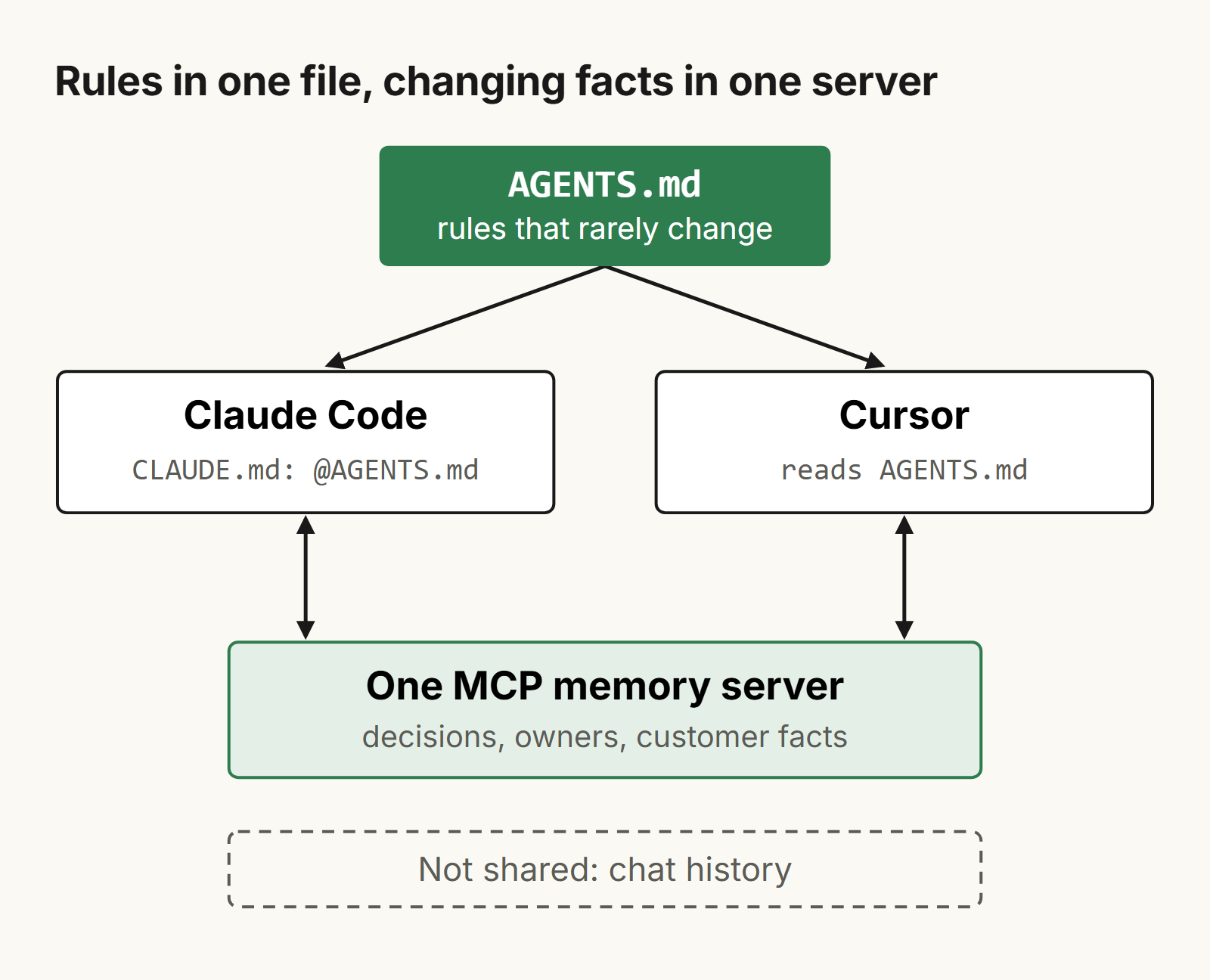
Claude Code and Cursor don't share chat history or memory, so with a fleet of agents each one starts blind. What they can share is the instruction files in your repo and the MCP servers they connect to. The quickest setup is one AGENTS.md as the single source of truth, a CLAUDE.md that imports it, Cursor rules only for what is relevant to Cursor, and one MCP memory server that every agent points to. It takes about ten minutes (as of November 2026).
How do I share one set of instructions between Claude Code and Cursor?
Keep the shared instructions in AGENTS.md in the root of your repo, and then have CLAUDE.md import it with @AGENTS.md.
This matters if you run a fleet of agents or have a team who work from the same rules. You change the rules in one place, and both the agents and the humans use the same information and don't drift apart.
Cursor reads AGENTS.md from the project root and from any subdirectory. Nested files are combined with their parents, and the more specific file, the one deeper in the tree, wins.
Claude Code reads AGENTS.md by itself only when there is no CLAUDE.md in the working directory or any directory above it, and it needs version 2.1.277 or newer. If a repo has both files, Claude Code reads only CLAUDE.md. So create a CLAUDE.md next to AGENTS.md like this:
@AGENTS.md

## Claude Code

Use plan mode for changes under `src/billing/`.
Anything below the import is for Claude only. If you don't need Claude-only content, a symlink also works:
ln -s AGENTS.md CLAUDE.md
On Windows use the import instead, because a symlink there needs admin privileges or Developer Mode, and Git checks a committed symlink out as plain text unless core.symlinks is enabled.
To check it, run /context all in Claude Code. CLAUDE.md should be listed under Memory files. Cursor CLI also picks up both AGENTS.md and CLAUDE.md from the project root.
How do Cursor rules work next to CLAUDE.md?
Cursor rules are the Cursor-only layer. Put in them only what the other agents should not see.
Project rules live in .cursor/rules/ and are committed into the repo. The files must have the .mdc extension, otherwise a plain .md file is ignored. Each rule has frontmatter with three fields:
---
description: How we write API handlers
globs: src/api/**/*.ts
alwaysApply: false
---
alwaysApply: trueputs the rule in every chat.globsattaches the rule when a matching file is in the context.- A
descriptionalone lets the agent decide whether to use the rule. - With none of them, the rule is used only when you @-mention it.
You can also define personal rules, which are global, in Customize, Rules. Team rules can be defined only on a Cursor Team or Enterprise plan, in the Cursor dashboard. When there is a conflict, team rules win over project rules, and project rules win over personal ones.
Going the other way, running /init in Claude Code reads .cursor/rules/ or .cursorrules and folds the relevant parts into the CLAUDE.md it writes. One rule should live in only one place. Don't copy rules between files.
What is Cursor memory, and does it carry over to Claude?
Cursor memories were notes Cursor wrote from your chats. They stay inside Cursor and don't reach Claude Code.
On a Cursor forum thread, a reply dated November 25, 2025 says the Memories feature was intentionally removed starting from version 2.1.x. The thread does not say whether the feature still runs. The advice in the thread is to press Cmd+Shift+P, run "Export memories", which saves a .mdc file, and then move that file into your rules.
So for a fleet of agents, think of Cursor memory as additional rules you maintain by hand, in files.
What is a Cursor memory bank?
A Cursor memory bank is a community pattern, not a Cursor feature. It is a set of markdown files in the repo that hold the goals of the project, the architecture, the key decisions and the progress. There is no official schema.
Since these are just markdown files, Claude Code can read them as well. Add a line to AGENTS.md that points to them.
How do I connect one MCP memory server to Claude Code and Cursor?
Use files for what rarely changes, and put what changes daily, like decisions, who owns what and facts about customers, into one MCP memory server that every agent calls.
With a fleet this matters, because you want all agents to use the same information and not to get stuck in local conversations where the information lives only in a chat history.
In Claude Code, add a remote server with claude mcp add. For Substrate it is:
claude mcp add --transport http substrate https://app.trysubstrate.co/mcp --scope user
--scope user makes it available in all your projects. --scope project writes a .mcp.json in the repo that your team shares through git. Check the result with claude mcp list, or /mcp inside a session. Substrate asks you to sign in and approve the connection in your browser; run /mcp in a session if that does not start by itself.
In Cursor, put the server in .cursor/mcp.json in your project, or in ~/.cursor/mcp.json to have it in every project:
{
  "mcpServers": {
    "substrate": {
      "url": "https://app.trysubstrate.co/mcp"
    }
  }
}
Cursor's docs describe OAuth sign-in for remote servers, and Substrate accepts Cursor's documented redirect URIs. Add the entry, restart Cursor and sign in when asked. We have not done a full end-to-end run in Cursor yet.
If a server uses a token instead of a sign-in, add it as a headers entry and keep it out of committed files. Use environment variables, ${env:NAME} in Cursor and ${NAME} in .mcp.json.
One product that can do this is Substrate (trysubstrate.co). You can read and edit the memory the agents recall, and it connects to agents through MCP. You approve or revoke each agent connection yourself. Claude Code can also install it as a plugin: claude plugin marketplace add Substrate-memory/Substrate-memory-plugins, then claude plugin install substrate-claude@substrate-marketplace.
There are other memory servers too. When you choose one, look at whether you can see and edit what is stored, and who can undo a change an agent made.
What still doesn't carry over between Claude Code and Cursor?
Chat history, each tool's own auto memory, and the tool-only features.
You don't have a shared chat history. You can't take a conversation from Claude Code and continue it in Cursor.
Claude Code's auto memory saves notes to ~/.claude/projects/<project>/memory/. It is machine-local, so it isn't shared with other machines, with Cursor or with your teammates. See Claude Code memory for how it works, and MCP memory for memory servers in general.
If you use path-scoped rules in both products you write them twice: once in the .mdc frontmatter for Cursor, and again in .claude/rules/ for Claude Code. Claude Code features such as hooks, skills and subagents are configured in Claude Code's own files and are not shared through AGENTS.md.
If you are in the middle of a task and switch tools, have the first agent write a short docs/handoff.md with the goal, the files changed, what was decided and what is left to do. Then tell the next agent to read it first.
Also remember that neither tool enforces what is written in these files. They are context, and you can't force an agent to follow them.
Who else needs this context besides the agents?
Your teammates, and files in a repo only reach the people who open the repo.
AGENTS.md and rules are good at telling an agent how the code works. They are not good for customer notes, decisions or plans. Substrate (trysubstrate.co) lets you share a page with specific named people by email invite, view-only, and you can revoke access. It is sharing a page, not a team workspace with roles. If your agents and your people only need the repo, you don't need it, and the files above are enough.
Frequently asked questions
How to share context between Claude and Cursor?
You can maintain the shared system instructions in the AGENTS.md file and then import this file into CLAUDE.md using @AGENTS.md.
Also, make sure that you connect both Claude and Cursor to the same memory server (MCP). Note that the chat history is not shared between the tools.
Do Claude Code and Cursor share chat history or memory?
No, they don't have access to each other's chat history or memory. What you can use between them are the instruction files you put in the repo (like AGENTS.md) and the MCP servers.
Does Claude Code read AGENTS.md?
Yes, since version 2.1.277 Claude Code can read AGENTS.md, but only if there is no CLAUDE.md in the same directory or in any parent directories.
If you want to have both, you should add the line @AGENTS.md at the top of your CLAUDE.md file, and then Claude will import the contents of that file.
Does Cursor read CLAUDE.md?
Cursor CLI reads AGENTS.md and CLAUDE.md in the project root directory, according to their documentation. The Cursor editor documentation only mentions AGENTS.md and .cursor/rules and does not mention reading CLAUDE.md. It is better to keep all shared instructions in AGENTS.md.
What is Cursor memory?
Memories are notes that Cursor wrote based on your chats. They are saved within Cursor and never get exposed to Claude Code. In November 2025 a user in the Cursor forum mentioned that this feature was removed in version 2.1.x. You can export them by pressing Cmd+Shift+P, typing "Export memories" and then moving the exported .mdc file into your rules.
How do I use one MCP memory server in both tools?
You can use claude mcp add --transport http <name> <url> in Claude Code.
Then, you need to add the same url to the mcpServers field in your ~/.cursor/mcp.json (or .cursor/mcp.json for one project).
For example: https://app.trysubstrate.co/mcp
Related posts
MCP memory: what it is, how to set it up, how to choose
What an MCP memory server is, real Claude Code and Cursor config for the official one, and how it compares with four alternatives.

Codex vs Claude Code: which should you use, and how do you use both?
Codex vs Claude Code as of November 2026: plans, AGENTS.md vs CLAUDE.md, MCP config, memory, and how to run both on one project.
How does memory work in Claude Code?
How Claude Code memory works: CLAUDE.md levels and load order, auto memory, imports, what survives /compact, and how to keep it useful as you grow.